How to Test Voice Notes Apps Before Choosing a Plan
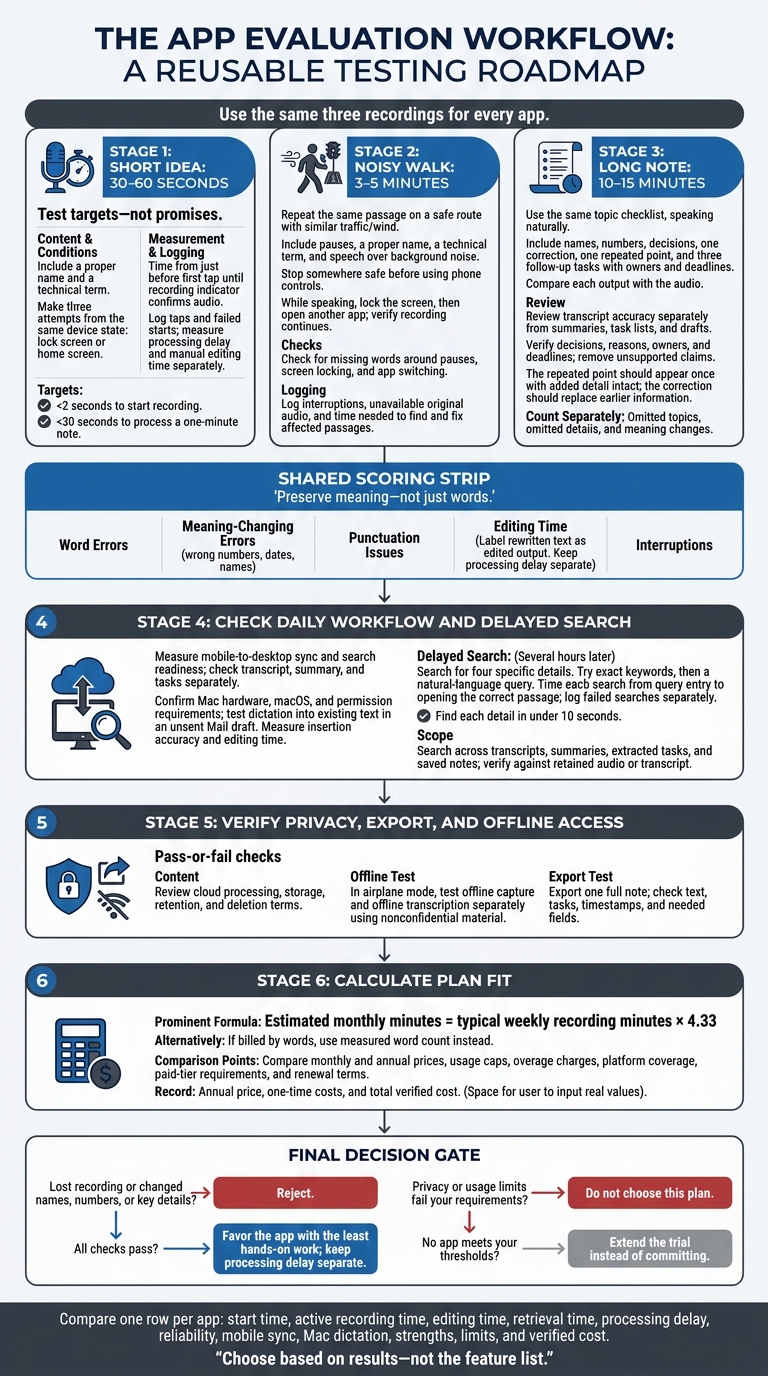
Test a voice notes app with three recordings before paying: a 30–60-second idea, a 3–5-minute noisy walk, and a 10–15-minute note. Choose based on accuracy, reliability, and time spent fixing and finding notes - not the feature list.
Use the same test conditions for each app, and check:
- Speed: Aim for under 2 seconds to start recording and under 30 seconds to process a one-minute note. These are test targets, not promises.
- Accuracy: Check names, numbers, decisions, summaries, and tasks against the audio. Track editing time separately.
- Daily use: Test mobile sync, Mac dictation, exports, and offline use. Search several hours later, aiming to find each detail in under 10 seconds.
- Plan fit: Review privacy, retention, usage caps, and total cost. Estimate monthly minutes by multiplying weekly use by 4.33.
Reject apps that lose recordings or change key details. Among those that pass, favor the one that needs the least hands-on work.
How to Test Voice Notes Apps Before Paying
Test Short Ideas and Outdoor Recording
Use these tests to check whether the app stays fast, accurate, and easy to use outside a quiet room. Start with timing, then test how it handles noise and motion.
Time a 30–60-Second Idea
Prepare a passage with a proper name and a technical term. Make three attempts, starting each from the same device state: either the lock screen or the home screen. Start the timer just before your first tap. Stop when the recording indicator shows that audio is being recorded, not when you tap the microphone. Log the number of taps and any failed starts.
After each attempt, measure the time between pressing Stop and receiving processed text. Count corrections, then time your manual edits separately. Record both launch time and missed starts so one fast, successful attempt doesn’t hide a failure.
If the app starts quickly, check whether it stays accurate while you’re moving.
Record on a 3–5-Minute Noisy Walk
Repeat the same passage on a safe route with similar traffic and wind conditions. Include pauses, a proper name, a technical term, and a sentence spoken over background noise. Stop somewhere safe before testing the phone controls. While you keep speaking, lock the screen, then open another app. Check whether recording continues through both actions.
If the original audio is available, replay the affected passages. Look for missing words around pauses, screen locking, and app switching. Time how long it takes to find and fix each passage. Note when the original audio isn’t available: without it, you may not be able to tell whether the app failed to record speech or transcribed it incorrectly.
Use both tests to check whether the app preserves meaning, not just words.
Count Transcript Errors and Meaning Changes
Compare the raw transcript with your prepared passage. Use the audio to check any differences from the script. Apply the same word-error counting rules throughout the test. Track wrong numbers, dates, and names separately as meaning-changing errors, rather than counting them again as word errors. Keep punctuation issues and intentional filler-word cleanup separate. If the app rewrites the text, label it as edited output.
| Test case | Word errors | Meaning-changing errors | Punctuation issues | Editing time | Interruptions |
|---|---|---|---|---|---|
| Short attempt 1 | Count | Count and affected detail | Count | Seconds | Count; audio unavailable |
| Short attempt 2 | Count | Count and affected detail | Count | Seconds | Count; audio unavailable |
| Noisy walk | Count | Count and affected detail | Count | Seconds | Count; audio unavailable |
sbb-itb-b6fe06e
Test Long Notes and AI Outputs
Check for Missing Topics and Details
Record a 10–15-minute discussion using the same topic checklist, but speak naturally. Include names, numbers, decisions, one correction, one repeated point, and three follow-up tasks with owners and deadlines.
Compare each output with the audio, not just the checklist. Your wording may change between attempts. Count omitted topics, omitted details, and changes in meaning separately. Track processing time and editing time separately, too.
Then check whether the same note can become a clean summary, task list, or draft.
Review Summaries, Tasks, and Drafts
Score transcript accuracy separately from the quality of summaries, tasks, and drafts. Check that each output keeps the decisions, reasons, owners, and deadlines. Time the edits needed to fill gaps and remove unsupported claims.
The repeated point should appear once, with any added detail intact. The correction should replace the earlier information. Request the same outputs in every trial.
Test Mobile Sync and Mac Dictation
After the long-note test, check whether the same note stays usable across devices and when inserted into existing text.
Measure how long the mobile note takes to appear on desktop and become searchable. Check the transcript, summary, and tasks separately.
Before testing Mac dictation, confirm the hardware, macOS, and permission requirements. Then open an unsent Mail draft, place the cursor within existing text, and trigger dictation. Measure insertion accuracy and editing time.
Test Search and Review Plan Terms
After testing speed and accuracy, check whether you can find notes later, rely on the workflow, and afford the plan.
Find 4 Details Several Hours Later
Search for four specific details from your test recordings. Start with exact keywords, then try a natural-language query. Time each attempt from entering the query to opening the correct passage, and log failed searches separately.
Check results against the original transcript or audio, if retained. Test searches across transcripts, summaries, extracted tasks, and saved notes.
Check Privacy, Export, and Offline Access
Once search works, check whether the note is safe to store, export, and use offline.
Read the privacy policy’s terms for cloud processing, storage, retention, and deletion. With airplane mode on, test offline capture and offline transcription separately, using nonconfidential material.
Export one full note and check its text, tasks, and timestamps. Make sure the export format keeps the fields you’ll need for later review.
Calculate Costs for Your Monthly Usage
If the workflow passes, check whether the plan fits your monthly use.
Multiply a typical workweek’s recording minutes by 4.33. If billing is based on words, use your measured word count instead.
Compare monthly and annual prices, usage caps, overage charges, and platform coverage. Check whether any features you used during the trial require a higher paid tier, and review renewal terms before paying.
Conclusion: Choose a Plan Based on Results
Test each app with the same recordings, then compare the time, cleanup, and reliability costs.
Choose the plan with the lowest hands-on time, keeping processing delay separate. Privacy and usage limits remain pass-or-fail checks.
Compare Results Before Paying
Build one final Markdown table with one row per tested app. Rank apps by measured performance - not marketing claims - and include these fields:
| Result group | Fields to include |
|---|---|
| Speed and editing | Recording start time, active recording time, editing time, retrieval time |
| Reliability | Processing delay, missing recordings, changes to key details |
| Practical fit | Mobile sync, Mac dictation, strengths, limits |
| Verified cost | Annual price, one-time costs, total verified cost |
Before paying, confirm you’ve completed all three recordings, output reviews, delayed searches, and pricing checks. Reject any app that loses a recording or changes names, numbers, or key details.
If no app meets your thresholds, extend the trial instead of committing to a plan. Don’t let a low price excuse unreliable notes or extra cleanup.
FAQs
How can I test accuracy without a prepared script?
Talk naturally about a workday topic, including names, technical terms, dates, and numbers. Record yourself in two settings: a quiet space and a noisy walk. Then compare each transcript with its original audio to check how background noise affects accuracy.
For results that better fit your work, add brand names or industry terms you use often to a custom dictionary.
How do I tell if an error is a recurring problem?
Compare editing time and review outputs across three to five cycles, using the same format each time. Review the results on a set schedule - ideally twice a day or during a dedicated 15-minute weekly session - and look for corrections that appear across multiple notes.
Add repeated corrections to your prompt as fixed instructions. Track approval history and prompt versions to see whether those changes resolve the issues over time.
How much editing time makes a paid plan worthwhile?
A paid plan is worth the cost if editing AI output, organizing follow-ups, and managing apps takes much less time than typing and organizing notes by hand.
Compare the total time from idea to usable draft - not just how fast the tool generates text.
For example, if your current process takes more than 50 minutes and a tool gets you to a draft-ready state in 5–10 minutes, a premium subscription is likely worth paying for.