
5 voice agent guardrail patterns for app actions
I treat a voice command as a draft - not permission to act. Before an agent sends an email, deletes a record, or moves money, I check the exact target and change, then ask for approval.
I use 5 guardrails to keep that boundary in place:
- Approval gates: Block writes unless approval matches the exact action.
- Read-only access: Allow lookups and drafts before enabling changes.
- Narrow tools: Give each tool one defined action, with backend limits.
- Schema validation: Check fields, recipients, amounts, and permissions before execution.
- Step-by-step confirmation: Show the final details and ask for Approve or Cancel.
My rule: <u>failed checks mean no action</u>. If anything changes after approval, I ask again. If a send times out, I check its status before retrying - not risk sending it twice.
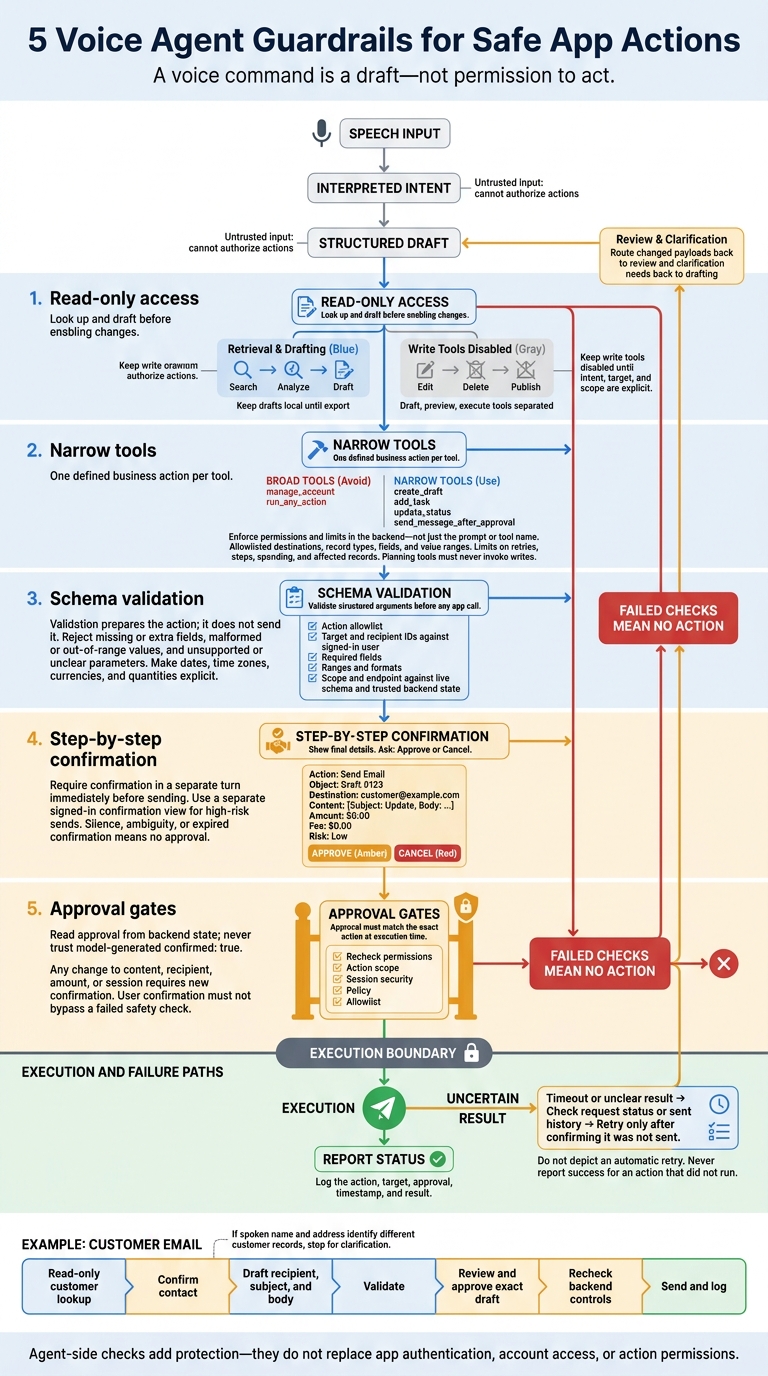
5 Voice Agent Guardrails for Safe App Actions
Building AI Agents: AI App Tools and Guardrails explained, Gmail Draft Agent [Part 2]
sbb-itb-b6fe06e
Separate Voice Requests From App Actions
Keep four stages separate: speech input, interpreted intent, structured draft, and execution. For an email request, stop at the draft until the user approves sending.
Treat speech and retrieved content as untrusted input. They can help shape a draft, but they cannot authorize an app action.
Enforce this boundary in the workflow - not just the prompt. Once a draft is staged, keep sending as a separate step that requires user confirmation before execution.
1. Require Approval for High-Impact Actions
High-impact actions need explicit approval and a fail-closed execution check: if a required check fails, the action must not run.
Risk addressed
A misheard request can expose private information, spend money, or remove access. Require explicit approval for every write or irreversible action, with a hard approval gate tied to the exact action.
Apply these controls by action type:
| Risk level | Actions | Required control |
|---|---|---|
| Read-only actions | Lookups, transaction history, balance checks | Enforce existing read permissions. |
| Approval required | Send, publish, delete, refund, change permissions | Require explicit approval of the exact target and change. |
| High-risk actions | Financial actions, sensitive signing | Require security checks plus device-backed verification or human review. |
Approval only works if the app enforces it at send time.
Enforcement point
At execution time, verify that approval matches the exact draft the user reviewed.
Required checks
Recheck permissions, action scope, and session security. Log the action, target, approval, timestamp, and result.
Failure handling
No clear approval, no action. Re-authenticate when session security changes. Block execution if any check fails, and never report success for an action that didn't run.
When approval isn't enough, limit what the agent can do by default.
2. Start With Read-Only Access
Risk addressed
An unclear voice request should not change app data. For new or high-risk workflows, allow retrieval, analysis, and drafts only. Keep drafts local until export.
Enforcement point
Set read-only limits through tool permissions and routing - not just the prompt. Use separate draft, preview, and execute tools. Disable execution tools during research, then open a separate action flow only after analysis. Read-only first; write later.
Workflow Before: Full access After: Read-only first Market research A vague request could trigger a purchase. Retrieve prices; do not order. Contract approval Signing could grant unlimited approval. Simulate effects; flag risks. Voice-note processing Raw content could reach an external app. Draft only; do not export.
These limits separate research from changes to funds or app data.
Required checks
Enable writes only when intent, target, and scope are explicit: what the user wants done, which recipient or asset is involved, and the exact amount or change allowed. Keep write tools disabled until the workflow switches to execution.
Failure handling
Missing data, a failed audit, or a permission, account, or schema mismatch must block execution. Explain what failed and keep write tools off. User confirmation must not bypass a failed safety check.
Once writes are allowed, limit each tool to one exact action.
3. Limit Tools to Specific Actions
Once writes are allowed, limit each tool to one action.
Risk addressed
Broad tools like
manage_accountandrun_any_actionwiden the blast radius of prompt injection. Define one business action per tool:create_draft,add_task,update_status,send_message_after_approval.
| Check | Broad tools | Narrow tools |
|---|---|---|
| Scope | Multiple business functions | One defined business action |
| Failure impact | Can affect the entire account | Limited to the tool’s domain |
| Validation difficulty | Many possible operations and inputs to check | Specific arguments and allowed values |
Enforcement point
Enforce permissions in the backend policy layer, outside the model. Allowlist destinations, record types, fields, and value ranges. Separate planning from execution: planning tools must never invoke writes. Check every tool call against a fixed schema.
Required checks
Validate arguments against the tool’s current schema. Set limits on retries, steps, spending, and affected records - not just individual calls. Backend policy must gate sends; a tool’s name isn’t a safeguard.
Failure handling
Reject unsupported parameters and requests outside the tool’s scope. Never guess or switch tools. Stop when access is denied. If a result is uncertain, block any actions that depend on it until review.
4. Validate Structured Action Arguments
Risk addressed
Output schemas limit what an agent can submit. They don’t prove an action is safe or intended. After the agent interprets speech, validate the payload before it reaches the app.
Enforcement point
Validate arguments at a server-side boundary before any webhook or app call. Use the current schema as the source of truth - not fields the model invents.
Required checks
Use a fixed allowlist for action names. Check target and recipient IDs against the signed-in user. Then validate the payload, scope, and endpoint against the live schema and trusted backend state, including required fields, ranges, and formats.
Convert dates, time zones, currencies, and quantities into explicit values before execution. Present those values for verification instead of guessing.
For example: October 22, 2026, 3:00 p.m. Eastern Time.
Don’t trust a model-generated confirmed: true. Read approval from backend state. Validation prepares the action; it does not send it.
Failure handling
Reject missing required fields, extra fields, malformed values, and out-of-range arguments. If a requested parameter isn’t supported or is still unclear, pause and explain what needs clarification. Block execution until the data, permissions, and required approval all pass validation.
After the payload passes validation, keep sending as a separate step that still requires user confirmation.
5. Confirm Each Step Before Sending
Risk addressed
Even a valid payload can target the wrong person.
Enforcement point
After validation, require user confirmation in a separate turn, immediately before sending. Voice offers no persistent review surface, so move high-risk sends to a separate, signed-in confirmation view.
Required checks
Once the payload passes schema checks, present it to the user for final review:
- Restate the action and object, and name the destination.
- Show the exact content, amount, fee, and risk warning.
- Ask for a binary decision: Approve or Cancel.
- Bind approval to that exact payload. Any change to the content, recipient, amount, or session requires new confirmation.
- Send only after approval. Then report the status and any status link.
This final check makes sending a deliberate action rather than an automatic response to validation.
Failure handling
Treat silence or ambiguity as no approval. If confirmation expires, ask again. If the result is unclear, report that uncertainty and check the status before retrying.
Use All 5 Patterns to Send a Customer Email
Together, these five patterns take a customer email from draft to send.
Retrieve the customer record through a read-only lookup and confirm the contact before drafting. If the spoken name and address match different customer records, stop and ask for clarification.
Once the recipient is confirmed, prepare the email in a draft-only tool, limited to recipient, subject, and body fields, and map only what the current schema supports.
Validate the recipient format and allowlist, then read back the address, subject, and key body details for user review before saving that exact draft for approval.
After validation and approval, recheck the session, policy, and allowlist before sending. If the content or arguments change, treat approval as stale and return the draft to review. Log the approved draft and result.
If sending fails, treat it as a status check, not a fresh send. If sending times out, check the request status or sent history before retrying. Retry only after confirming the email was not sent.
Conclusion: Limit, Validate, and Confirm Actions
Use all five patterns together: read-only defaults, narrow tools, schema validation, approval gates, and step-by-step confirmation. Each addresses a different failure mode. Read-only mode limits damage, but it doesn’t prevent scams or sends to the wrong recipient.
The destination app must still enforce authentication, account access, and action permissions. Agent-side checks add protection - they don’t replace those controls.
Before expanding write access, test one send workflow with dedicated test accounts. Check that execution stops when confirmation is missing, arguments aren’t supported, or the session isn’t authenticated. Expand access only after these checks reliably block execution.
FAQs
How can I prevent duplicate actions after a timeout?
Leave unanswered requests pending or cancel them - don’t retry automatically. Log each request’s status, timestamp, reviewer decision, and execution result. Before triggering any action, run an idempotency check to confirm it hasn’t already been completed and isn’t in progress.
Keep quote, confirm, and execute as separate steps, not a single turn. Require explicit human confirmation for every action to prevent duplicates.
Can I safely approve several actions at once?
No. Every high-stakes action or movement of funds needs its own explicit confirmation before execution. Check each item separately to verify its intent, owner, destination, and level of commitment. Use a quote-check-confirm-act workflow to catch possible errors or misunderstandings before finalizing each action.
How can I test guardrails against prompt injection?
Test with ambiguous language, multiple speakers, and different date formats. Use a quote-check-confirm-act workflow to keep AI extraction separate from execution. Never quote and execute in the same assistant turn. Treat every AI output as an unverified draft.
Sample outputs regularly. Use repeated errors to refine schemas, prompts, and routing rules. Before any high-stakes action, require explicit human approval with an audit record to prevent unapproved or unexpected execution.