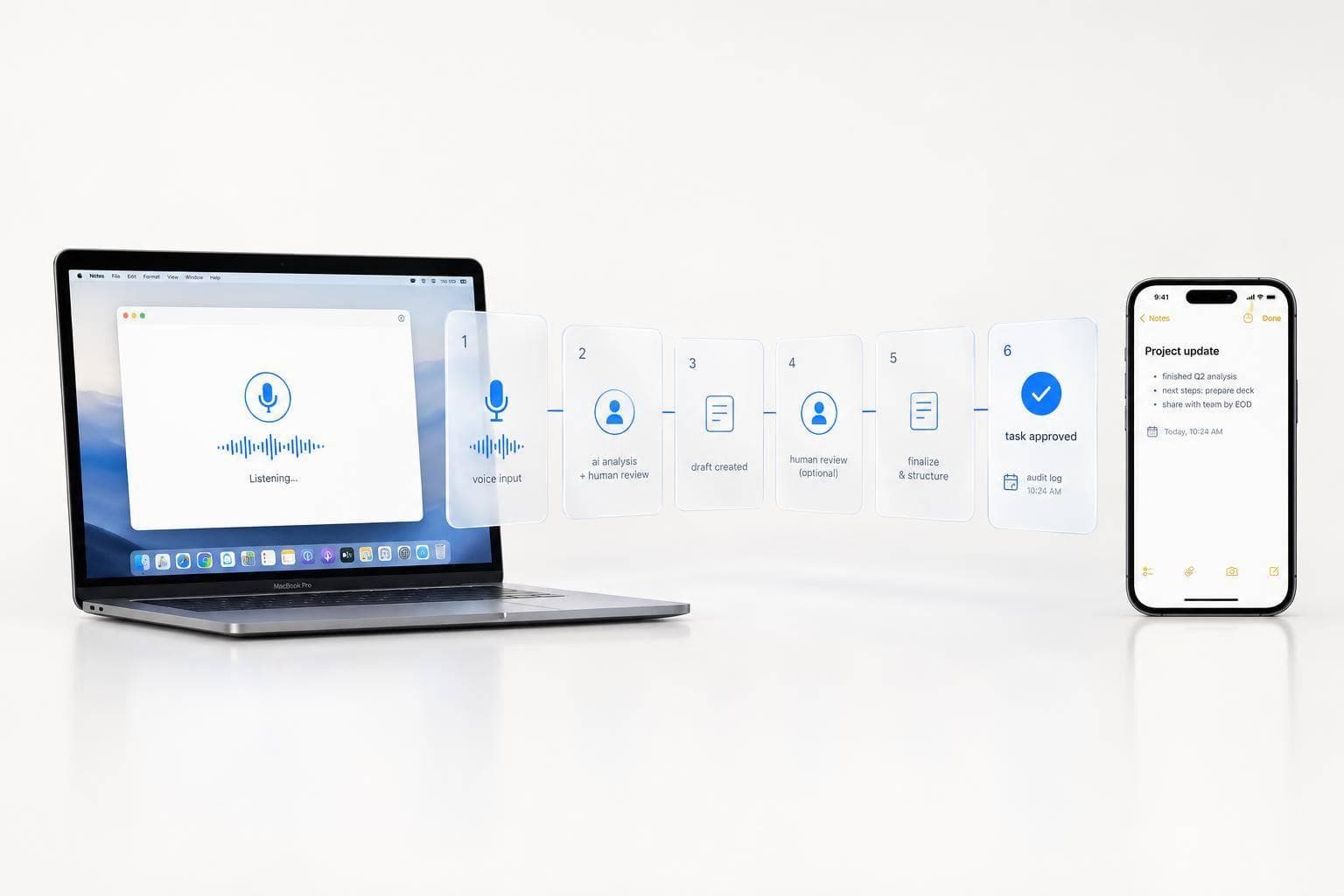
How Human-in-Loop AI Workflows Run on Voice Notes
I use AI to turn voice notes into drafts - not permission to act. Before an email goes out or a task gets assigned, I check the source, confirm the details, and approve the exact action and destination.
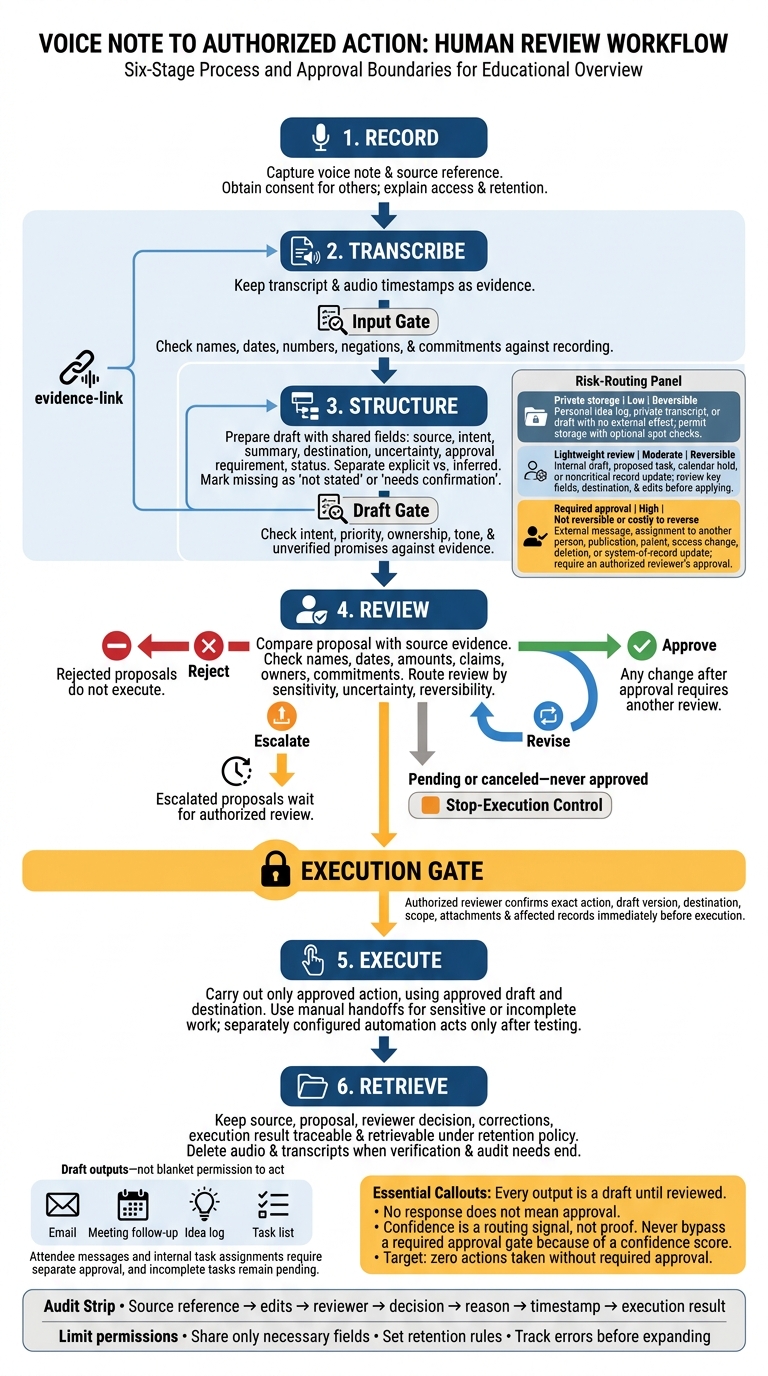
My workflow has 6 stages: record, transcribe, structure, review, execute, and retrieve. OneKey helps prepare drafts for emails, meeting follow-ups, idea logs, and task lists. I keep the transcript beside each draft so I can check names, dates, owners, and commitments.
- Check before acting: Flag missing details rather than guess.
- Match review to risk: Give sensitive or hard-to-reverse actions closer review.
- Keep a record: Log the draft version, reviewer, decision, and result.
- Start small: Limit access, set retention rules, and track errors before expanding use.
My rule is simple: <u>no response does not mean approval</u>. I aim for zero actions taken without required approval - and treat every output as a draft until reviewed.
Human-in-the-Loop AI: Voice Notes to Approved Actions
Every Business Should Automate This Process
sbb-itb-b6fe06e
Build Your Voice-to-Action Workflow
After recording and drafting, set the fields, checks, and approval rules that turn a voice note into an authorized action.
Choose Note Types and Required Fields
Assign each note a type and a shared set of fields: source reference, intent, summary, destination, uncertainty, approval requirement, and status. Decide which fields are required before connecting a destination. Mark missing details as not stated or needs confirmation.
| Note type | Additional required fields |
|---|---|
| Recipient, subject, claims, requested action, attachments, send status | |
| Meeting follow-up | Participants, decisions, open questions, action owners, due dates, distribution list |
| Idea log | Original idea, assumptions, evidence, tags, next experiment |
| Task list | Task, owner, priority, deadline, dependencies, destination |
Verify Details Against the Source
Link every required field to the exact transcript passage or audio timestamp. When turning the transcript into a draft, separate explicit instructions from inferences. Check names, amounts, claims, owners, and commitments. Flag unclear speech or conflicting dates - don't silently choose an answer. Convert relative deadlines using the recording date and confirmed time zone, then display the full U.S. date and time.
Set role-based access, encryption, and deletion rules before rollout. Delete audio and transcripts once verification and audit needs end. Share only the fields each destination needs, and set separate permissions for viewing evidence, editing drafts, and executing actions.
Request Approval and Log the Decision
Route proposals based on sensitivity, uncertainty, and reversibility. Any change after approval requires another review. Provide paths to approve, revise, reject, escalate, or time out. Unanswered requests must stay pending or be canceled.
The reviewer approves the exact action, draft version, and destination - not the note as a whole. Log the source reference, edits, reviewer, decision, reason, timestamp, and execution result.
Use manual handoffs for sensitive or incomplete work. For repeatable work, separately configured automation may execute actions only after testing the required fields, destination, and review controls. Give each integration only the permissions it needs.
Set Review Rules Before Taking Action
Once the draft is ready, define what reviewers must check before any action can run.
Review Inputs, Drafts, and Final Actions
Use three review gates: input, draft, and execution. These gates control the handoff from draft to action in the six-stage workflow.
Check the transcript for errors in names, dates, numbers, negations, and commitments. Review the draft for intent, priority, ownership, tone, and unverified promises. Before approving the final action, confirm its destination and scope. Escalate sensitive content or anything beyond the reviewer’s authority.
Match Review Levels to Risk
Set the review depth based on how easily an action can be reversed.
| Handling mode | Risk | Reversibility | Trigger | Reviewer action |
|---|---|---|---|---|
| Private storage | Low | Reversible | Personal idea log, private transcript, or draft with no external effect | Permit storage with optional spot checks |
| Lightweight review | Moderate | Reversible | Internal draft, proposed task, calendar hold, or noncritical record update | Review key fields, destination, and edits before applying |
| Required approval | High | Not reversible or costly to reverse | External message, assignment to another person, publication, payment, access change, deletion, or system-of-record update | Require an authorized reviewer’s approval |
Confidence is a routing signal, not proof. A transcription with a high confidence score can still name the wrong person or miss context. Never let that score bypass a required approval gate.
Show Reviewers the Evidence and Options
Keep the source transcript, audio timestamp, proposed output, uncertainty flags, and edits together. Show recipients, affected records, the destination, and whether the action can be reversed. Reviewers need enough context to judge the result - not just a polished draft and a confirmation button.
Provide clear Approve, Revise, Reject, and Escalate controls, plus a way to stop execution. Editing a draft does not count as approval.
Use Voice Notes for 4 Common Outputs
Once a voice note is transcribed and reviewed, it can become an email, meeting follow-up, saved idea, or task list. Each action still needs approval.
Voice input - hypothetical examples Structured fields Human review Approved action Email: “Email Jordan at Acme to confirm we can move the product demo to Thursday, explain that the pricing file is attached, and ask whether 2:00 p.m. Eastern works.” Recipient; subject; requested response; attachment Verify recipient, exact date, time zone, availability, pricing claim, and attachment Send only after explicit approval Meeting follow-up: “In today’s Acme meeting, we agreed to launch the pilot next month; Priya owns the data export, and the client will send sample files by Friday. I think the security question is still open.” Decisions; risks; questions; owners; deadlines Confirm recollections, assignments, and exact deadlines against meeting evidence Approve the attendee message separately from internal tasks Idea log: “What if we made a lightweight dashboard that shows founders which customer requests keep repeating? Start with support tickets and test it with three companies.” Concept; assumptions; experiment; tags; review date Preserve tentative wording; confirm visibility, project, tags, and review date Save only after confirmation. Task list: “Follow up with legal on the contract, send Maya the revised forecast, and review the onboarding metrics before the next leadership meeting.” One task per action; owner; due date; dependencies Confirm owners, forecast approval, meeting date, and review scope Create only confirmed tasks; hold incomplete items
The examples below show what to keep, what to check, and what must wait for approval.
Draft Emails and Approve Before Sending
Voice input: Use the Acme email request above.
Draft - not approved to send: Leave the exact date unresolved until it’s checked.
Subject: Product demo: Thursday at 2:00 p.m. ET?
Hi Jordan,
We can move the product demo to Thursday at 2:00 p.m. ET. The pricing file is attached. Does that time work for you?Review: Check availability, since the draft makes a commitment. Verify the recipient, exact date, time zone, and pricing claim, then attach the correct pricing file.
Approved action: Approve the message and attachment together, then send the approved email through the chosen email tool.
Check Meeting Follow-Ups Before Sharing
Voice input: Use the Acme meeting recollection above.
Draft: Group the recap into decisions, open questions, owners, and deadlines. Keep security under open questions - not approved decisions.
Review: Treat the pilot timing, Priya’s ownership, and Friday’s sample-file deadline as recollections until meeting evidence confirms them. If “next month” has no agreed launch date, leave the date unresolved.
Approved action: Approve and share the attendee recap separately from assigning internal tasks.
Save Ideas Without Changing Their Meaning
Voice input: Use the dashboard idea above. Keep the original wording beside the structured concept.
Draft: Keep the idea tentative, retain founders as the audience, and record testing with three companies as the proposed experiment. Neither the idea nor the proposed test confirms demand.
Review: Use support tickets to test whether requests repeat, not as proof of demand. Confirm the tags, project, visibility, and review date.
Approved action: Save only after confirmation.
Confirm Task Owners and Due Dates
Voice input: Use the legal, forecast, and onboarding requests above.
Draft: Split the spoken list into three proposed tasks, with an owner, due date, and dependencies for each.
Review: Maya is the recipient, not necessarily the task owner. “Before the next leadership meeting” needs a confirmed date and deliverable. Check priority, dependencies, forecast approval, and the scope of the metrics review rather than guessing.
Approved action: Create only confirmed tasks. A similar task title does not authorize an update. Leave items with missing owners, conflicting dates, or unclear scope pending.
Conclusion: Start Small and Check Results
Keep every step traceable: voice note → transcript → draft → evidence review → approved action → stored record. OneKey prepares the draft; people approve the action. Store the transcript, proposal, reviewer decision, corrections, and action result with the source, following your data retention policy.
Start With Drafts and Limited Permissions
Begin with low-risk notes, private drafts, and idea records. Expand access only as review quality improves. Limit destination permissions, give reviewers the source evidence, and require explicit approval for external messages, assignments, payments, deletions, and other high-impact actions.
Define who can approve each action and when approval expires. Unanswered requests stay pending - not approved.
When recordings involve other people, explain the purpose, who can access them, and how long you’ll retain them. Get required consent, offer a non-recording option, and provide redaction or deletion.
Track Errors and Update Review Rules
Use review data to tighten the workflow after rollout. Each week, sample outputs and log corrections, rejections, failures, and duplicates. Track transcription accuracy, field-extraction accuracy, correction rate, and median review time. Count actions taken without required approval separately: the target is zero.
Before expanding permissions, test unclear speech, multiple speakers, names, dates, numbers, and mixed-language voice notes. Use recurring errors to update schemas, prompts, and routing rules. Require absolute dates, confirm ambiguous names, and send unclear speaker assignments to manual review. Retest after each material change.
FAQs
How can I prevent duplicate actions after approval?
Use a “quote-check-confirm-act” workflow: let AI extract suggested actions, then have a person review them once to confirm intent, owner, deadline or timing, and commitment level. Complete this review before routing actions to external tools or triggering webhooks.
For high-stakes actions or external commitments, require confirmation or manual routing. Keep follow-ups separate from dependencies so the same note doesn’t trigger overlapping actions.
What if an approved action fails?
If an approved action fails, the safety rule still applies: don’t execute it automatically in one step. Use a quote-check-confirm-act workflow to review AI-extracted tasks before they reach your internal tools.
AI can misread vague intent or references. Manually confirm each task’s owner, deadline, and details - especially when money, legal commitments, or external actions are involved. For high-stakes items, turn on OneKey’s manual confirmation setting to require explicit approval before notes enter your workflow.
How do I handle conflicting reviewer decisions?
Require human review before any automated action. AI may mistake a loose idea for a firm commitment. Review each suggested task to confirm its owner, deadline, and intended purpose.
If reviewers disagree or the intent is unclear, mark the topic as an open item or pending discussion. Assign someone to gather the information needed to resolve it. Until then, don’t let the note trigger downstream workflows or financial actions.