How Founders Use Voice Notes for Content Ideas
Most founders don’t run out of ideas. They lose them before they write them down.
If I had to sum up the article in one line, it would be this: speak the idea fast, keep each note short, turn audio into text, sort it once a week, and publish from that pile. That is the whole system.
Here’s the short version:
- Record within 60 seconds of the idea showing up
- Keep most notes under 2 minutes
- Use one idea per note
- Follow a simple speaking pattern: who it’s for, the problem, key points, next step
- Turn the audio into text within 24 hours
- Tag notes by type: Story, Truth, Lesson, Framework
- Sort everything in a 15-minute weekly review
- Move used notes into Shipped
Why does this work? Because speaking is often faster than typing. And when an idea shows up during a walk, commute, or meeting, speed matters. The article also points out a big payoff: sorted notes can cut publishing time from 50+ minutes to about 5–10 minutes per piece.
What stood out to me is how simple the workflow is. I’m not trying to make the note polished on the spot. I’m just trying to save the thought, keep the original wording, and give my future self a clear next move. That alone makes the system easier to stick with.
A few points matter most:
- Short notes are easier to review
- Light editing beats heavy rewriting
- Topic labels make notes searchable
- A weekly sort keeps the pile from turning into junk
- The spoken phrasing often becomes the draft
The article also mentions tools like OneKey for turning spoken ideas into clean text right away, on mobile or Mac. But the main lesson is not about software. It’s about habit: save the idea now, sort it later, publish from the best ones.
If I were putting this into practice today, I’d start with one rule: when an idea hits, I talk before I type.
Build a simple voice-note capture routine
The goal is simple: catch content ideas fast, before they vanish. Keep the setup easy: something that works on your phone and slips into the gaps that already exist in your day. Then, once the idea is saved, you can turn it into something you can use again.
Record within 60 seconds and keep notes under 2 minutes
The main rule is simple: start recording within 60 seconds of an idea showing up. That’s when the feeling behind the idea is still strong.
Try to keep most memos under 2 minutes so they’re easier to review later. If one idea needs more room, break it into separate clips. One idea per recording. Hold the phone close to your mouth, and make sure the mic isn’t blocked.
Use a repeatable speaking template for cleaner drafts
Rambling memos are harder to shape into a draft later. Use the same simple template every time: who it’s for, the problem, the key points, and the next action. That gives the note a clear path toward a post, thread, or newsletter instead of leaving it as a half-formed thought.
You can also tag each note as Story, Truth, Lesson, or Framework. Pick one and stick with it.
A small habit can help a lot: end each memo with a direct instruction for later, such as "turn this into a LinkedIn post" or "summarize this for a team update".
Capture ideas during walks, commutes, and meetings without stopping mid-idea
Most good ideas don’t show up when you’re sitting neatly at a desk. They tend to hit while you’re moving: on a commute, between meetings, or right after a user or client conversation. In those moments, the goal isn’t polished delivery. It’s to catch the thought before it slips away. If you repeat yourself, that’s fine. If you use filler words, that’s fine too.
If you’re outside, step into a quieter spot when you can so background noise doesn’t bury the note.
Capture during walks, commutes, meetings, and customer conversations. Clean it up later.
Next, turn each memo into a clean draft by transcribing, labeling, and trimming it.
sbb-itb-b6fe06e
Turn raw voice notes into structured drafts
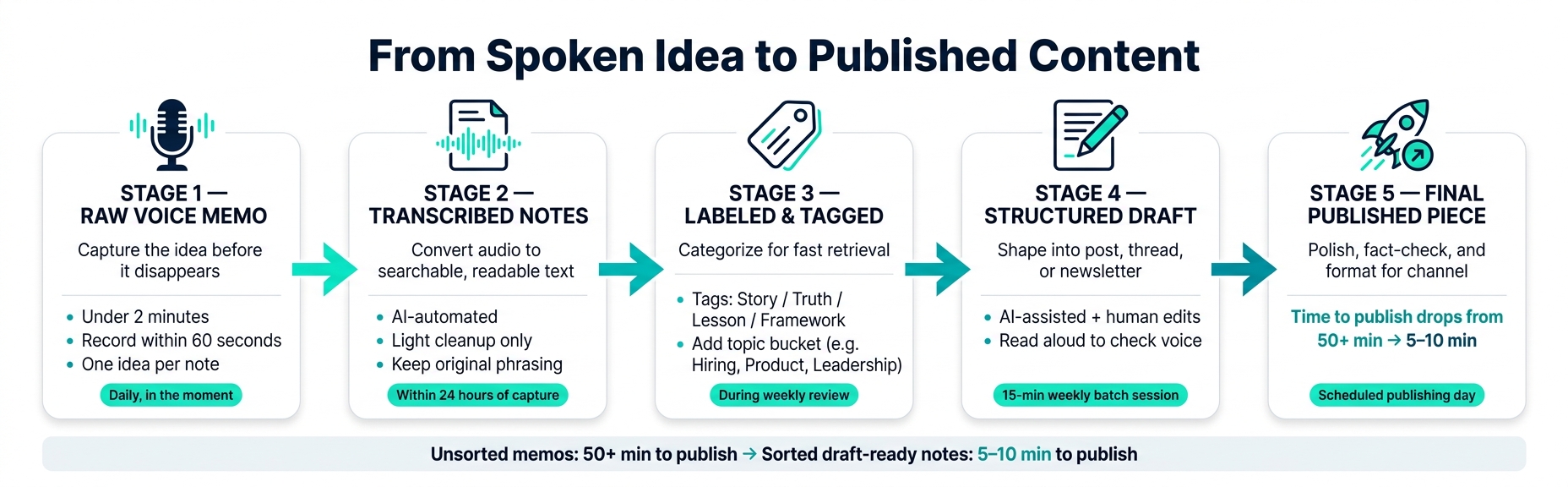
Voice Note to Published Content: A Founder's 5-Stage Workflow
A memo you record on a walk, during a commute, or in the middle of a meeting only starts to matter when you can search it and turn it into a draft. The path is simple: transcribe it, edit it, label it, then shape it into a post, thread, or newsletter. That’s how a quick voice memo turns into content you can use.
Transcribe, clean, and label notes by topic
Start by turning the audio into text with an AI tool. Then give it a light cleanup. Cut false starts, filler words, and repeated phrases, but keep your original wording and natural rhythm. The goal isn’t to make it sound like stiff office copy. It’s to make it readable without sanding off your voice.
"Edit this transcript into a clean draft. Remove filler words, false starts, and repetition. Preserve the original phrasing, examples, and conversational rhythm wherever possible... Do not rewrite sentences for 'professionalism' - keep my voice intact." - Digital Startup Lifestyle
Once the note is cleaned up, label it by topic. For founders, useful buckets often include:
- Fundraising
- Hiring
- Product lessons
- Leadership
- Customer insights
That small step makes your notes far easier to search and come back to later. After that, the memo is ready to become a post, thread, or newsletter.
Convert one note into a post, thread, or newsletter draft
One tight memo can turn into a post, a thread, or a newsletter draft. The best format depends on the angle and where the idea belongs.
Use AI to clean things up, then step in and edit for voice, accuracy, and fit. That last pass matters most. You’re still the editor. Check any numbers, stats, or attributions before anything goes live. Then read the draft out loud. If a line doesn’t sound like something you’d say in real life, the edit went too far.
From raw memo to published content: a stage-by-stage breakdown
The table below shows how a spoken idea moves from capture to publication, along with the rough effort at each stage.
| Stage | Purpose | Content | Effort | Timing |
|---|---|---|---|---|
| Raw voice memo | Capture the idea before it disappears | Under 2 minutes | Very low | Daily, in the moment |
| Transcribed notes | Convert audio to searchable, readable text | Searchable text | Low (automated) | Within 24 hours of capture |
| Structured draft | Shape into a specific format (post, thread, email) | Draft-ready copy | Medium (AI + your edits) | Weekly batch session |
| Final published piece | Polish, fact-check, and format for the channel | Varies by channel | High (human review) | Scheduled publishing day |
The draft stage is where you cut, tighten, and decide if the idea deserves to be published.
Use OneKey to turn ideas into clean text right away
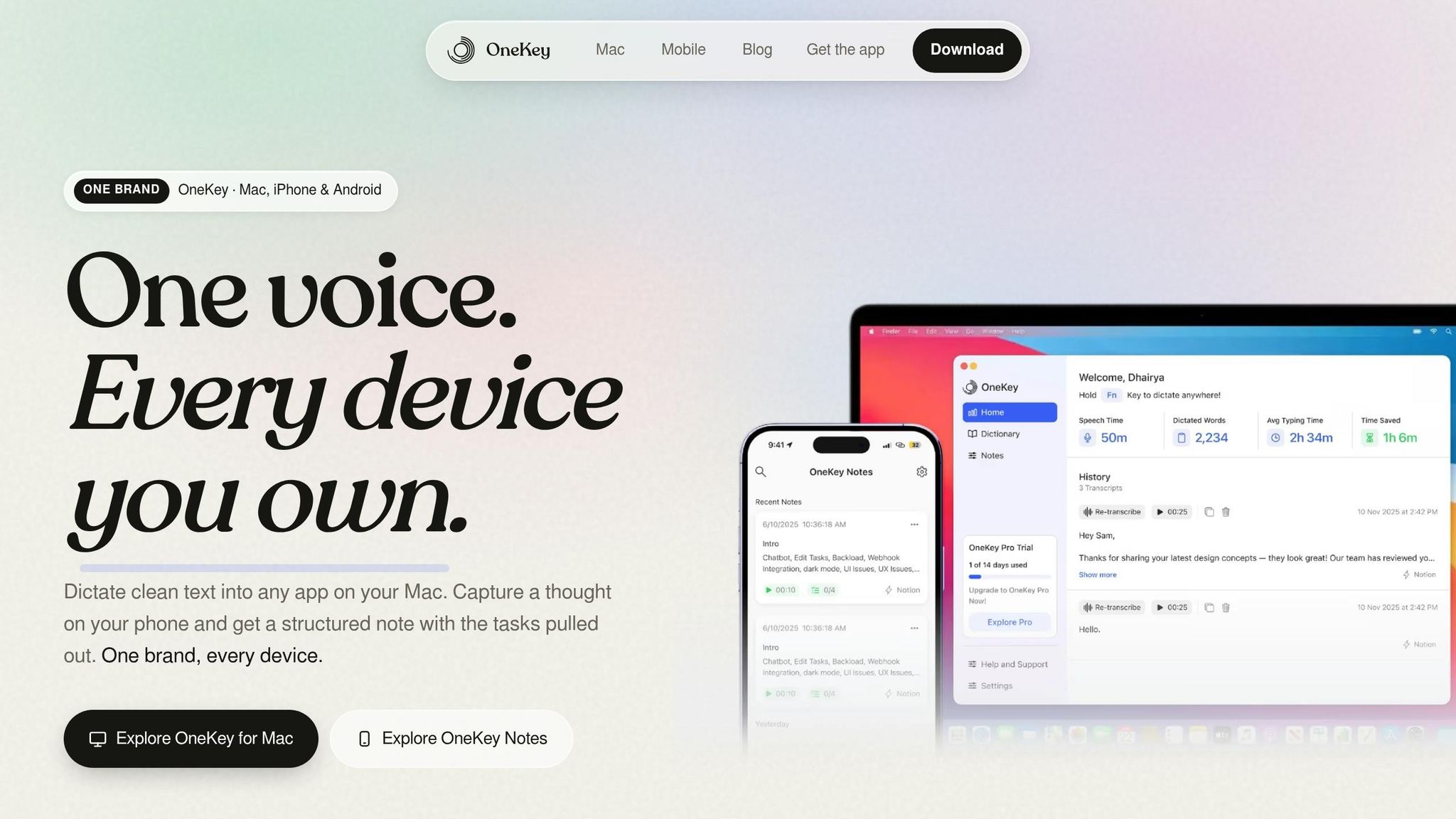
If you want the cleanup to happen while you capture the idea, OneKey fits well here. It turns a spoken thought into draft-ready text fast - a post draft, thread outline, or newsletter angle - without making you deal with a separate transcription step.
On mobile, OneKey lets you save a post hook, talking point, or rough draft the second it hits. And the note comes back as usable text, not just a voice clip.
On Mac, you press a key, speak, and OneKey drops cleaned-up text into any app. If you capture a note on mobile, it syncs to desktop when you sit down to write. That means less cleanup before your weekly sort.
The mobile app is free to start. The Mac version uses a one-time license.
Review and sort notes into a draft-ready workflow
Run a weekly 15-minute review to tag and route each note
After capture, send notes to a weekly review queue.
Set one fixed time each week and treat it like a short meeting with yourself. Keep it to one uninterrupted 15-minute block. During that review, tag each note as Story, Truth, Lesson, or Framework. Then send it to a single output: a blog outline, thread, newsletter brief, or LinkedIn post.
Keep the original quote beside a one-line hook. That way, you hold on to the feeling and detail that made the note worth saving in the first place. When you come back later, you don’t need to replay the full memo just to remember why it mattered.
Once a note is used, move it to Shipped so your active list stays clean.
Unsorted memos vs. sorted draft-ready notes: a side-by-side look
Sorted notes are easier to publish because the hook is already there.
| Unsorted Voice Memos | Sorted Draft-Ready Notes | |
|---|---|---|
| Retrieval speed | Slow; requires re-listening to audio | Instant; categorized by topic and hook |
| Time to publish | 50+ minutes per piece | 5–10 minutes per piece |
| Content quality | Often generic or rambling | High; filtered for sharpness and category |
Conclusion: capture fast, sort weekly, publish from spoken ideas
Capture fast, review weekly, keep the hook, and move used notes into Shipped.
For founders whose ideas show up faster than they can type, a voice-first workflow turns walks, commutes, and meeting memos into draft-ready notes - one weekly sort at a time.
FAQs
What should I say in a voice note?
Don’t script it. Just talk.
Keep it natural, use short conversational blocks, and let the AI clean up filler words and repeated lines later.
A simple flow works best:
- the problem
- why it matters
- your solution
- one specific example or lesson
If you use OneKey, you can capture raw founder insights from anywhere and turn them into polished posts, summaries, or emails.
How do I organize voice notes so I can find them later?
Turn voice notes into notes you can scan, search, and use as soon as you can. Pull out the main themes, action items, and short briefs, then save everything in one central library.
Tools like OneKey can turn spoken thoughts into ready-to-use drafts or task lists. That makes them much easier to file now and find again later.
A short review on a regular basis also helps keep notes from piling up.
What if my voice notes sound messy or repetitive?
That’s completely normal. A lot of founders use voice notes to think out loud, and that messy, repetitive style often helps get ideas down before they slip away.
You don’t need to edit yourself while you’re talking. Just speak. Then let AI clean up the transcript by cutting filler, removing repetition, and sorting your thoughts into a clear outline. Tools like OneKey can turn rough notes into structured summaries, posts, or task lists.